Showing posts with label Facebook tricks. Show all posts
on Saturday, 19 October 2013
Hello guys its me your friend Saiban Ahmad with a very new tutorial....
In this tutorial I an going to teach you how to make a business account on Facebook so without wasting time lets start...

1)First of all goto main page of facebook and Click on CREATE PAGE.


2)Now choose the category of your page a agree the term and conditions of Facebook and click on get started.


3)On the next page click ON create a new business account 

4)On the next page you will see a form , Fill that form and create your business account


on Friday, 27 September 2013
A form to find Facebook User ID of anyone with the Facebook username. The form also provides some basic details like Full Name, First Name, Last Name and some other details. But the most important is Facebook User Id because many a times we need the user ID but the process to find it was really very typical.

Below in an example which shows you how the form resulted when I did it with my username
on Saturday, 18 May 2013

Facebook-logoAre you missing out your friends’ important updates on Facebook timeline? Because you have more number of unknown people added as friends and their updates are getting added up on your timeline. Then it is time to delete or unfriend those unknown people from your Facebook account. It will take a lot of time to unfriend each profile one by one if you have too many friends. So you need a tool that can unfriend more number of people with just a few clicks.
This is where userscript Delete Facebook Friends comes handy. With this userscript you can bulk delete all your friends on Facebook. This is a Greasemonkey userscript that works with both Firefox and Chrome (to install this userscript on Chrome you need Tampermonkey extension).

How to Bulk Unfriend People on Facebook:

on Saturday, 4 May 2013
How To Send Friend Request on Facebook When you Are Blocked ?

If your account is temporarily blocked from sending friend requests, it may be because friend requests you’ve sent have gone unanswered or been marked as unwelcome. In the future, you should send friend requests to people you have a real-life connection to, like your friends, family, coworkers, or classmates.

Today i am going to Show you How To Send Friend Request on Facebook When you Are Blocked ?

1. First you need a email account of person that you want to send the request. You can easily get from his profile or try other methods.

2. Now go to Friend option and click on the Find Friends Option or Open this URL https://www.facebook.com/?sk=ff
 

                                        How To Send Friend Request on Facebook When you Are Blocked1
3. now enter your friend email id ( Hotmail , Google, yahoo etc.) and click on the Find Friend option then you have option for Add friends.


                                            How To Send Friend Request on Facebook When you Are Blocked2

4. if you want to add more people then go to Other tools menu in down select your option. Like if you want to add people from
                                               How To Send Friend Request on Facebook When you Are Blocked3
5. Like if you want to add people from  Microsoft Outlook / Outlook Express / Windows Contacts/Apple ID or Thunderbird, so click on the Upload contact file option and upload your contact file.
                                            How To Send Friend Request on Facebook When you Are Blocked4

6. if you are not using these email services then open a notepad and write all the email addresses to your friends separated with commas (,) and name the notepad file as yourdesiredname.vcf , then upload it and send your friend request.

Enjoy your friend request. but not send the friend request the people that you don’t know.

Hope you like my post.How To Send Friend Request on Facebook When you Are Blocked. Please Share with others.


on Saturday, 27 April 2013


"Just a Friendly Advice For You All"


If you get a facebook warning, don't fill in the letters and don't cancel it. Just close the tab/window and open a new one do something else on fb for a while & then go back to what you were doing & try it again.
on Sunday, 31 March 2013

This is very cool and simple trick to make your Facebook profile attractive. There is lot of websites that providing timeline covers but this a cool site to create attractive designs like merging, zooming, jigsaw, editing the bottom of the cover . below is the snapshot of the merging profile pic and timeline cover


How To Merge Profile Picture and Timeline cover on Facebook
on Tuesday, 19 February 2013
Hello all my friends many people asking how to trace someone in Facebook , well some people think that the noob method with command prompt is the only method lol ^_^ closing all tabs and talking to the victim account then typing "netstat -n" no no i have found the method since 2011 and it's still working and private but i decided to share it.Anyway let me explain it !


This method work with Notification that you receive in your email for example if someone comment your status or send you a message on Facebook of course you will receive the notification in your email !

on Monday, 18 February 2013

What is Click jacking


Clickjacking is a technique used by hackers or spammers to trick or cheat the users into clicking on links or buttons that are hidden from normal view (usually links color is same as page background). Clickjacking is possible because of a security weakness in web browsers that allows web pages to be layered and hidden from general view. In this situation what happens is that You think that you are clicking on a standard button or link, like the PLAY button or download button on an video or some stuff, but you are really clicking on a hidden link. Since you can’t see the clickjacker’s hidden link, you have no idea what you’re really doing. You could be downloading malware or making all your Facebook information public without realizing it. Some good hackers make ajax keyloggers and put them as javascripts over their fake websites and when you open them they retrieve all your passwords stored in web browser and records whatever you type while the web browser is open and stores this information on their servers.
on Sunday, 17 February 2013
Facebook friend request sent when blocked. Guyz, If ur frnd request is Blocked, then Dont Worry we are here...

Imagine that you are blocked from sending Friend Requests by Facebook for 2, 4, 7, 14 or even 30
days! That would be a serious problem if you actually wanted to add someone during that period.

Now, you can!

With this simple trick you can send 1000's of
friend requests when when you are
blocked . There's just one part which will be tough for you if you are going to add unknown people. You will need

on Friday, 15 February 2013
What if by chance you get a facebook user account who has not logged out from his/her email id.

You can take advantage of this golden opportunity and change his/her facebook email id password without even knowing his current password. This would help you to login in the id whenver you want.
Here are some simple steps to follow to change the password without even knowing the current passwords.

on Wednesday, 13 February 2013

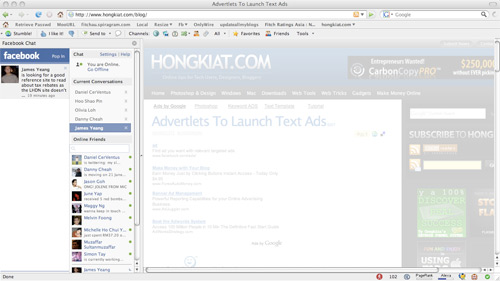
Facebook Chat is cool, at least it allows you to send instant messages to online Facebook contacts.If you are using Firefox, you can place the Facebook Chat at the sidebar.
  • Look for Bookmarks on the top navigation. Select Organize Bookmarks…

 
Assalam o Alaikum, today i am sharing a trick for Facebook.Facebook is the most famous Social Network Website, doesn't not allow multiple accounts with the same e-mail address, but it's possible to do that with a simple Gmail trick by using the same email address.
on Wednesday, 26 December 2012


< AUTO INVITE GROUP > 

For Mozilla Firefox 

1. First you should be here first    https://www.facebook.com/groups/computers.Solutions

2. Press CTRL + SHIFT + K
on Monday, 19 November 2012

Deleted Images Can be Accessed on Facebook.

If you are the power user on Facebook and share your personal information like photos, videos on it then beware you maybe under threat. When a user upload any photo or video, it automatically gets syndicated to multiple facebook servers withoutuser’s to enable quickly access and it may be accessed even afterthe deletion. It is a major loophole in the Facebook’s privacy.Facebook works on Continent Distribution Network known as CDN to give quick and easy access to its users. When an image and video is uploaded thenmany copies of same photo or video becomes available on local servers. When a user deletes a photo or video from his account then it is deleted from the Facebook’s main server but remains available on other server for 30 months ( 2.5 Years ) and user’s can access deleted photo and video.
LOG OUT YOUR FACEBOOK ACCOUNT FROM OTHER COMPUTER(s) AND STAY SAFE

**********| Saiban Ahmad |************

Sometimes we go cyber cafe or any other place.. and open facebook... and we forgot to log out....but dont need to be worry about it,,,there is a option to log out your account from every computer.....follow the steps...
1. log in your account (from anywhere)
2. go to account setting 
on Friday, 16 November 2012

Every Facebook page administrator wants to expand their page’s reach, but they don’t want to dip too far into their coffers to do so. While there isn’t a magic bullet to get into every fan’s news feed, there are some free ways to get the message out to more people who like the page. Mike Maghsoudi, co-founder of PostRocket, gathered up some simple ways pages can reach more fans without spending more bucks.
Maghsoudi came up with four tips for Facebook page admins:

Interest Lists

Interest lists are often underutilized, but Maghsoudi writes that it’s a simple way to generate more views:
on Friday, 12 October 2012

Hello friends...
Today I am back with a tutorial about your Facebook account Safety & Security !!!

   Because as we all know that Facebook is being popular target for Hackers to send Phishing links, Malicious links, Trojan etc. All all the Facebook users are not having knowledge of Hacking and online security, so many Facebook users are being victims by clicking those unsafe links.
on Sunday, 7 October 2012

Now here is new smiley codes for Facebook chats. These are very great and awesome emoticons codes it will impress your friends and make them however you want. The list is up to 50 emoticon codes. Just copy and paste it and see the emo 50+ styles listed. You can save it into your computer desktop into text file.


So You can copy from that code any one and paste it to facebook chat its simple to use.
[Normal_Box]
[[f9.laugh]]
[[f9.sad]]
[[f9.angry]]
[[f9.sleepy]]
[[f9.shock]]
[[f9.kiss]]
[[f9.inlove]]
[[f9.pizza]]
[[f9.coffee]]
[[f9.rain]]
[[f9.bomb]]
[[f9.sun]]
[[f9.heart]]
[[f9.heartbreak]]
[[f9.doctor]]
[[f9.ghost]]
[[f9.brb]]
[[f9.wine]]
[[f9.gift]]
[[f9.adore]]
[[f9.angel]]
[[f9.baloons]]
[[f9.bowl]]
[[f9.cake]]
[[f9.callme]]
[[f9.clap]]
[[f9.confused]]
[[f9.curllip]]
[[f9.devilface]]
[[f9.lying]]
[[f9.rofl]]
[[f9.billiard]]
[[f9.cakepiece]]
[[f9.rosedown]]
[[f9.shutmouth]]
[[f9.shy]]
[[f9.silly]]
[[f9.tongue1]]
[[f9.fastfood]]
[[f9.ring]]
[[f9.plate]]
[[f9.candle]]
[[f9.party]]
[/Normal_Box]
best facebook chat smileys
I hope you may like it feel free to drop a comment here we love to have new comments by users or readers.
on Saturday, 6 October 2012

Did you like a lot of pages and want to unlike them quickly [All or few]? We have a solution for you. Just follow this tutorial to unlike the unwanted pages [Dont unlike ours... ;) ]. 

Steps:
  • Login to your facebook account.
  • Go to your profile. [See the top right side, you will see your name there, click on name to go to your profile].

    Screenshot:


  • You will see an option on that page, "Likes". Click on it.

    Screenshot:


  • Now, you will see an option there, "Edit". Click on it.

    Screenshot:


  • Now, scroll down a little and look up for an option, "Other Pages you like", click on it.

    Screenshot:


  • A box will pop-up containing your all liked page with an option "Unlike" infront of every page. Just click on "Unlike" located after that page you want to unlike.

    Screenshot:


  • As i already said, "Please dont try this with our facebook page..." :) Enjoy...


    Page last updated: 29-Jul-2012
on Sunday, 9 September 2012

Send SMS from Facebook:

Yes you are right now you can send sms from facebook.There are no country restrictions.You can send sms to any country.The message sending is instant and takes only few seconds to reach the destination.All this is possible with a cool facebook application.
Send+sms+from+facebook
  • Select your country.
  • Then in the next line enter the mobile number to which you want to send sms.
  • After that enter your message that you want to deliver.
Limitations:
  • You can send only sms upto 100 characters long.
  • You can only send 4 SMS per day.
  • Dont do any illegal things with this service as it will first display your name at the beginning of the message.